---
title: How to configure your laser cutting project?
description: When your Vectoriel file has been uploaded onto the Sculpteo website with a valid format (We highly recommend the SVG format. Other possible formats are DXF, AI, EPS, PDF), the configuration needs to
---
[Skip to content](https://learn.sculpteo.com/migration/en/how-to-configure-your-laser-cutting-project#main-content)
- [English](https://learn.sculpteo.com/migration/en/how-to-configure-your-laser-cutting-project)
- [Deutsch](https://learn.sculpteo.com/migration/de/wie-konfiguriert-man-ein-laserschneideprojekt)
- [Español](https://learn.sculpteo.com/migration/es/cómo-configurar-su-proyecto-de-corte-por-láser)
- [Français](https://learn.sculpteo.com/migration/fr/comment-configurer-votre-projet-de-découpe-laser-1)
English
Show submenu for translations

- [Order your 3D Parts](https://www.sculpteo.com/en/upload/)
- [Business Services](https://www.sculpteo.com/en/services/)
Open main navigation
Close main navigation
- [Order your 3D Parts](https://www.sculpteo.com/en/upload/)
- [Business Services](https://www.sculpteo.com/en/services/)
- - [English](https://learn.sculpteo.com/migration/en/how-to-configure-your-laser-cutting-project)
- [Deutsch](https://learn.sculpteo.com/migration/de/wie-konfiguriert-man-ein-laserschneideprojekt)
- [Español](https://learn.sculpteo.com/migration/es/cómo-configurar-su-proyecto-de-corte-por-láser)
- [Français](https://learn.sculpteo.com/migration/fr/comment-configurer-votre-projet-de-découpe-laser-1)
English
Show submenu for translations
- [Contact us](https://www.sculpteo.com/en/contact/)
[Contact us](https://www.sculpteo.com/en/contact/)
How can we help you?
- There are no suggestions because the search field is empty.
1. [Help Center](https://learn.sculpteo.com/migration/en?hsLang=en)
2. [How to order and get a quote?](https://learn.sculpteo.com/migration/en/how-to-order-and-get-a-quote?hsLang=en)
3. [Upload your file](https://learn.sculpteo.com/migration/en/how-to-order-and-get-a-quote?hsLang=en#upload-your-file)
- [About Sculpteo and our services](https://learn.sculpteo.com/migration/en/about-sculpteo-and-our-services?hsLang=en#main-content)
- [Who are we?](https://learn.sculpteo.com/migration/en/about-sculpteo-and-our-services?hsLang=en#who-are-we)
- [Our 3D printing services](https://learn.sculpteo.com/migration/en/about-sculpteo-and-our-services?hsLang=en#our-3d-printing-services)
- [Our laser cutting services](https://learn.sculpteo.com/migration/en/about-sculpteo-and-our-services?hsLang=en#our-laser-cutting-services)
- [Contact us](https://learn.sculpteo.com/migration/en/about-sculpteo-and-our-services?hsLang=en#contact-us)
- [How to order and get a quote?](https://learn.sculpteo.com/migration/en/how-to-order-and-get-a-quote?hsLang=en#main-content)
- [Your account](https://learn.sculpteo.com/migration/en/how-to-order-and-get-a-quote?hsLang=en#your-account)
- [Prepare your 3D file](https://learn.sculpteo.com/migration/en/how-to-order-and-get-a-quote?hsLang=en#prepare-your-3d-file)
- [Upload your file](https://learn.sculpteo.com/migration/en/how-to-order-and-get-a-quote?hsLang=en#upload-your-file)
- [Correct and improve your 3D files thanks to our online tools](https://learn.sculpteo.com/migration/en/how-to-order-and-get-a-quote?hsLang=en#correct-and-improve-your-3d-files-thanks-to-our-online-tools)
- [Ordering](https://learn.sculpteo.com/migration/en/how-to-order-and-get-a-quote?hsLang=en#ordering)
- [Shipping and payment](https://learn.sculpteo.com/migration/en/shipping-and-payment?hsLang=en#main-content)
- [Delivery](https://learn.sculpteo.com/migration/en/shipping-and-payment?hsLang=en#delivery)
- [Pricing](https://learn.sculpteo.com/migration/en/shipping-and-payment?hsLang=en#pricing)
- [English FAQ](https://learn.sculpteo.com/migration/en/english-faq?hsLang=en#main-content)
- [Pricing](https://learn.sculpteo.com/migration/en/english-faq?hsLang=en#pricing)
# How to configure your laser cutting project?
When your Vectoriel file has been uploaded onto the Sculpteo website with a valid format (We highly recommend the SVG format. Other possible formats are DXF, AI, EPS, PDF), the configuration needs to be made:
The first thing to understand is how the mouse works with your object:
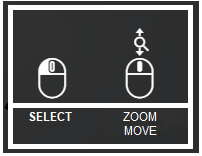
The left button can help you select the different lines you want to change the style by holding the button down and moving over the cutting lines you wish to configure.
The wheel in the middle allows you to zoom in & out and also move the object when pressed.
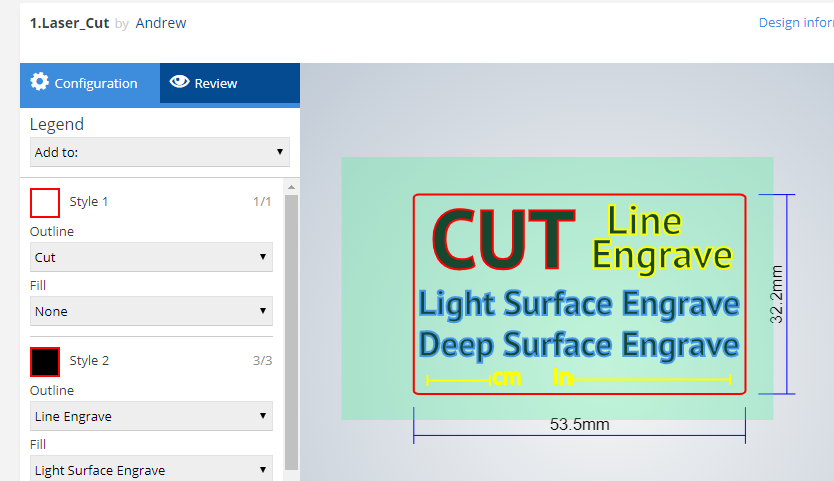
When you have uploaded a vector file, several styles are already registered and configured on your object. To start from scratch, you can select all of the objects with the left-hand button on the mouse as shown here:
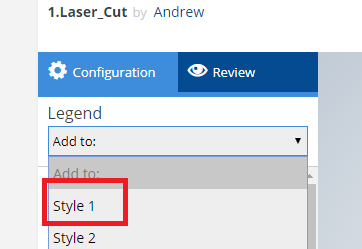
You will then need to go to "legend" and select "style 1":
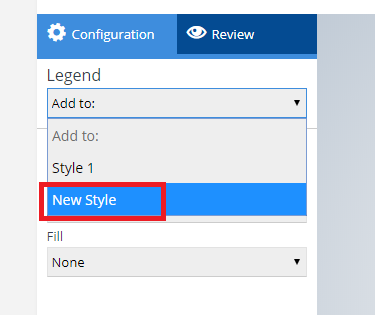
You can then identify part by part which configuration you would like following the same process as above.
#### What are the possibilities for the outline or fill?
The outline has several options:
- Cutting line (outline only)
- Line engrave (outline only)
- Light surface engrave & Deep surface engrave (available for both outline & fill) :
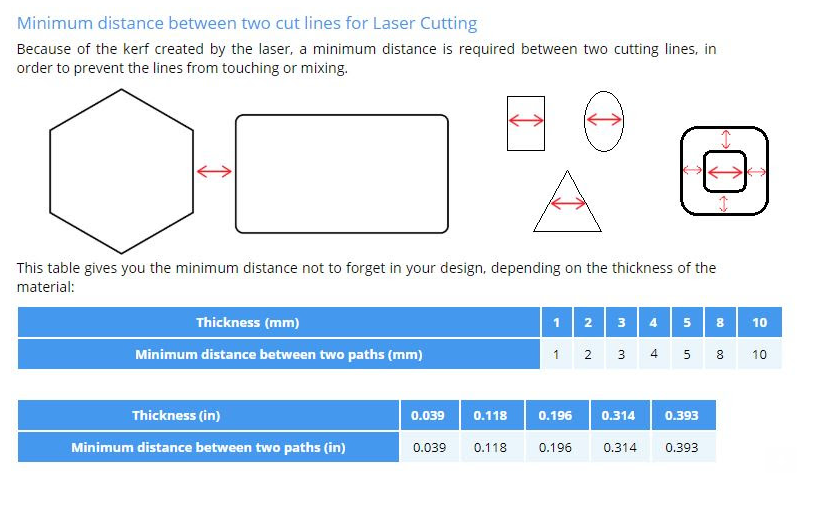
Please keep in mind that we recommend a 1 to 1 ratio:
- [Order your 3D Parts](https://www.sculpteo.com/en/upload/)
- [Business Services](https://www.sculpteo.com/en/services/)
[](http://www.sculpteo.com)
[mailto:contact@sculpteo.com](mailto:contact@sculpteo.com)
Copyright © 2026, Sculpteo