---
title: How to use the cutaway view in the 3D viewer
description: "The feature “Cutaway view” 'is used to view the inside of the 3D model. This offers the possibility to control two things: To use the section view, simply enable this feature by selecting the "Cutaway"
---
[Skip to content](https://learn.sculpteo.com/migration/en/how-to-use-the-cutaway-view-in-the-3d-viewer#main-content)
- [English](https://learn.sculpteo.com/migration/en/how-to-use-the-cutaway-view-in-the-3d-viewer)
- [Deutsch](https://learn.sculpteo.com/migration/de/so-verwenden-sie-die-schnittansicht-im-3d-viewer)
- [Español](https://learn.sculpteo.com/migration/es/cómo-utilizar-la-vista-de-corte-en-el-visor-3d)
- [Français](https://learn.sculpteo.com/migration/fr/comment-utiliser-la-vue-en-coupe-dans-le-viewer-3d)
English
Show submenu for translations

- [Order your 3D Parts](https://www.sculpteo.com/en/upload/)
- [Business Services](https://www.sculpteo.com/en/services/)
Open main navigation
Close main navigation
- [Order your 3D Parts](https://www.sculpteo.com/en/upload/)
- [Business Services](https://www.sculpteo.com/en/services/)
- - [English](https://learn.sculpteo.com/migration/en/how-to-use-the-cutaway-view-in-the-3d-viewer)
- [Deutsch](https://learn.sculpteo.com/migration/de/so-verwenden-sie-die-schnittansicht-im-3d-viewer)
- [Español](https://learn.sculpteo.com/migration/es/cómo-utilizar-la-vista-de-corte-en-el-visor-3d)
- [Français](https://learn.sculpteo.com/migration/fr/comment-utiliser-la-vue-en-coupe-dans-le-viewer-3d)
English
Show submenu for translations
- [Contact us](https://www.sculpteo.com/en/contact/)
[Contact us](https://www.sculpteo.com/en/contact/)
How can we help you?
- There are no suggestions because the search field is empty.
1. [Help Center](https://learn.sculpteo.com/migration/en?hsLang=en)
2. [How to order and get a quote?](https://learn.sculpteo.com/migration/en/how-to-order-and-get-a-quote?hsLang=en)
3. [Correct and improve your 3D files thanks to our online tools](https://learn.sculpteo.com/migration/en/how-to-order-and-get-a-quote?hsLang=en#correct-and-improve-your-3d-files-thanks-to-our-online-tools)
- [About Sculpteo and our services](https://learn.sculpteo.com/migration/en/about-sculpteo-and-our-services?hsLang=en#main-content)
- [Who are we?](https://learn.sculpteo.com/migration/en/about-sculpteo-and-our-services?hsLang=en#who-are-we)
- [Our 3D printing services](https://learn.sculpteo.com/migration/en/about-sculpteo-and-our-services?hsLang=en#our-3d-printing-services)
- [Our laser cutting services](https://learn.sculpteo.com/migration/en/about-sculpteo-and-our-services?hsLang=en#our-laser-cutting-services)
- [Contact us](https://learn.sculpteo.com/migration/en/about-sculpteo-and-our-services?hsLang=en#contact-us)
- [How to order and get a quote?](https://learn.sculpteo.com/migration/en/how-to-order-and-get-a-quote?hsLang=en#main-content)
- [Your account](https://learn.sculpteo.com/migration/en/how-to-order-and-get-a-quote?hsLang=en#your-account)
- [Prepare your 3D file](https://learn.sculpteo.com/migration/en/how-to-order-and-get-a-quote?hsLang=en#prepare-your-3d-file)
- [Upload your file](https://learn.sculpteo.com/migration/en/how-to-order-and-get-a-quote?hsLang=en#upload-your-file)
- [Correct and improve your 3D files thanks to our online tools](https://learn.sculpteo.com/migration/en/how-to-order-and-get-a-quote?hsLang=en#correct-and-improve-your-3d-files-thanks-to-our-online-tools)
- [Ordering](https://learn.sculpteo.com/migration/en/how-to-order-and-get-a-quote?hsLang=en#ordering)
- [Shipping and payment](https://learn.sculpteo.com/migration/en/shipping-and-payment?hsLang=en#main-content)
- [Delivery](https://learn.sculpteo.com/migration/en/shipping-and-payment?hsLang=en#delivery)
- [Pricing](https://learn.sculpteo.com/migration/en/shipping-and-payment?hsLang=en#pricing)
- [English FAQ](https://learn.sculpteo.com/migration/en/english-faq?hsLang=en#main-content)
- [Pricing](https://learn.sculpteo.com/migration/en/english-faq?hsLang=en#pricing)
# How to use the cutaway view in the 3D viewer
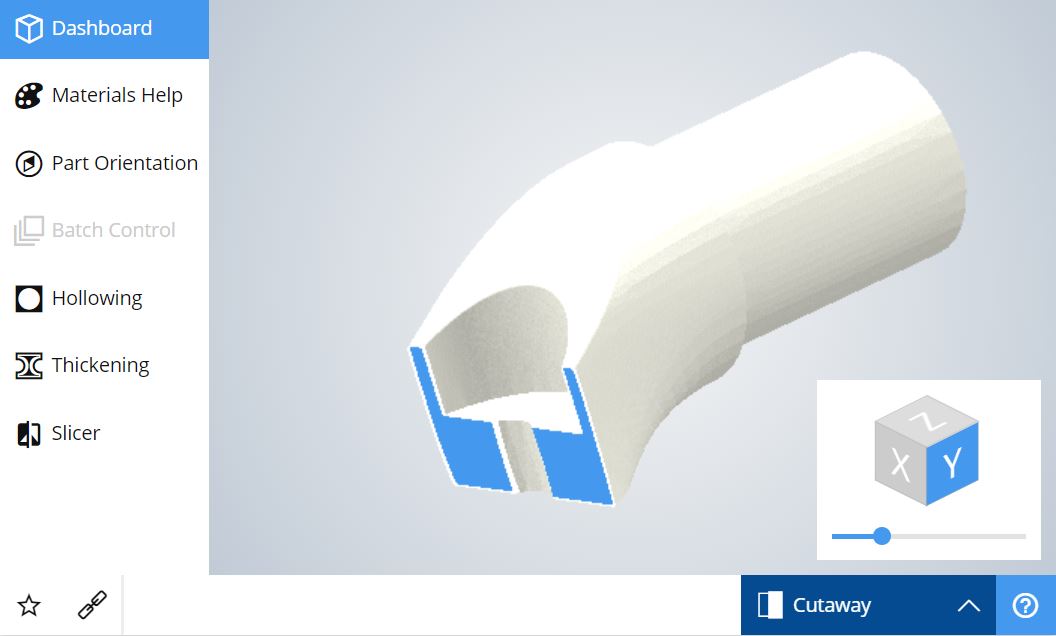
The feature “Cutaway view” 'is used to view the inside of the 3D model. This offers the possibility to control two things:
- Ensure that a 3D model is correctly hollowed and that the position of the holes is adequate to allow the removal of the excess powder.
- Check that there is indeed a gap between different volumes that make up a moving object.
To use the section view, simply enable this feature by selecting the "Cutaway" option instead of "Default view" in the lower right corner of the viewer 3D.
- [Order your 3D Parts](https://www.sculpteo.com/en/upload/)
- [Business Services](https://www.sculpteo.com/en/services/)
[](http://www.sculpteo.com)
[mailto:contact@sculpteo.com](mailto:contact@sculpteo.com)
Copyright © 2026, Sculpteo