---
title: Comment utiliser la vue en coupe dans le viewer 3D ?
description: "La fonctionnalité 'Vue en Coupe' permet de visualiser l'intérieur de son modèle 3D. Cela offre la possibilité de contrôler 2 points essentiels: Pour utiliser la vue en coupe, il vous suffit de sélecti"
---
[Passer au contenu](https://learn.sculpteo.com/migration/fr/comment-utiliser-la-vue-en-coupe-dans-le-viewer-3d#main-content)
- [Français](https://learn.sculpteo.com/migration/fr/comment-utiliser-la-vue-en-coupe-dans-le-viewer-3d)
- [Deutsch](https://learn.sculpteo.com/migration/de/so-verwenden-sie-die-schnittansicht-im-3d-viewer)
- [English](https://learn.sculpteo.com/migration/en/how-to-use-the-cutaway-view-in-the-3d-viewer)
- [Español](https://learn.sculpteo.com/migration/es/cómo-utilizar-la-vista-de-corte-en-el-visor-3d)
Français
Afficher le sous-menu pour les traductions

- [Order your 3D Parts](https://www.sculpteo.com/en/upload/)
- [Business Services](https://www.sculpteo.com/en/services/)
Ouvrir la navigation principale
Fermer la navigation principale
- [Order your 3D Parts](https://www.sculpteo.com/en/upload/)
- [Business Services](https://www.sculpteo.com/en/services/)
- - [Français](https://learn.sculpteo.com/migration/fr/comment-utiliser-la-vue-en-coupe-dans-le-viewer-3d)
- [Deutsch](https://learn.sculpteo.com/migration/de/so-verwenden-sie-die-schnittansicht-im-3d-viewer)
- [English](https://learn.sculpteo.com/migration/en/how-to-use-the-cutaway-view-in-the-3d-viewer)
- [Español](https://learn.sculpteo.com/migration/es/cómo-utilizar-la-vista-de-corte-en-el-visor-3d)
Français
Afficher le sous-menu pour les traductions
- [Contact](https://www.sculpteo.com/en/contact/)
[Contact](https://www.sculpteo.com/en/contact/)
Comment pouvons-nous vous aider ?
- Il n'y a aucune suggestion car le champ de recherche est vide.
1. [Help Center](https://learn.sculpteo.com/migration/fr?hsLang=fr)
2. [Comment commander et obtenir un devis?](https://learn.sculpteo.com/migration/fr/comment-commander-et-obtenir-un-devis?hsLang=fr)
3. [Corriger et améliorer vos fichiers grâce à nos outils](https://learn.sculpteo.com/migration/fr/comment-commander-et-obtenir-un-devis?hsLang=fr#corriger-et-am%C3%A9liorer-vos-fichiers-gr%C3%A2ce-%C3%A0-nos-outils)
- [A propos de Sculpteo et de nos services](https://learn.sculpteo.com/migration/fr/a-propos-de-sculpteo-et-de-nos-services?hsLang=fr#main-content)
- [Qui sommes-nous ?](https://learn.sculpteo.com/migration/fr/a-propos-de-sculpteo-et-de-nos-services?hsLang=fr#qui-sommes-nous)
- [Nos services d'impression 3D](https://learn.sculpteo.com/migration/fr/a-propos-de-sculpteo-et-de-nos-services?hsLang=fr#nos-services-dimpression-3d)
- [Nos services de découpe laser](https://learn.sculpteo.com/migration/fr/a-propos-de-sculpteo-et-de-nos-services?hsLang=fr#nos-services-de-d%C3%A9coupe-laser)
- [Nous contacter](https://learn.sculpteo.com/migration/fr/a-propos-de-sculpteo-et-de-nos-services?hsLang=fr#nous-contacter)
- [Comment commander et obtenir un devis?](https://learn.sculpteo.com/migration/fr/comment-commander-et-obtenir-un-devis?hsLang=fr#main-content)
- [Votre compte](https://learn.sculpteo.com/migration/fr/comment-commander-et-obtenir-un-devis?hsLang=fr#votre-compte)
- [Préparer vos fichiers 3D](https://learn.sculpteo.com/migration/fr/comment-commander-et-obtenir-un-devis?hsLang=fr#pr%C3%A9parer-vos-fichiers-3d)
- [Transférer vos fichiers](https://learn.sculpteo.com/migration/fr/comment-commander-et-obtenir-un-devis?hsLang=fr#transf%C3%A9rer-vos-fichiers)
- [Corriger et améliorer vos fichiers grâce à nos outils](https://learn.sculpteo.com/migration/fr/comment-commander-et-obtenir-un-devis?hsLang=fr#corriger-et-am%C3%A9liorer-vos-fichiers-gr%C3%A2ce-%C3%A0-nos-outils)
- [Commander](https://learn.sculpteo.com/migration/fr/comment-commander-et-obtenir-un-devis?hsLang=fr#commander)
- [Livraison et paiement](https://learn.sculpteo.com/migration/fr/livraison-et-paiement?hsLang=fr#main-content)
- [Livraison](https://learn.sculpteo.com/migration/fr/livraison-et-paiement?hsLang=fr#livraison)
- [Prix](https://learn.sculpteo.com/migration/fr/livraison-et-paiement?hsLang=fr#prix)
# Comment utiliser la vue en coupe dans le viewer 3D ?
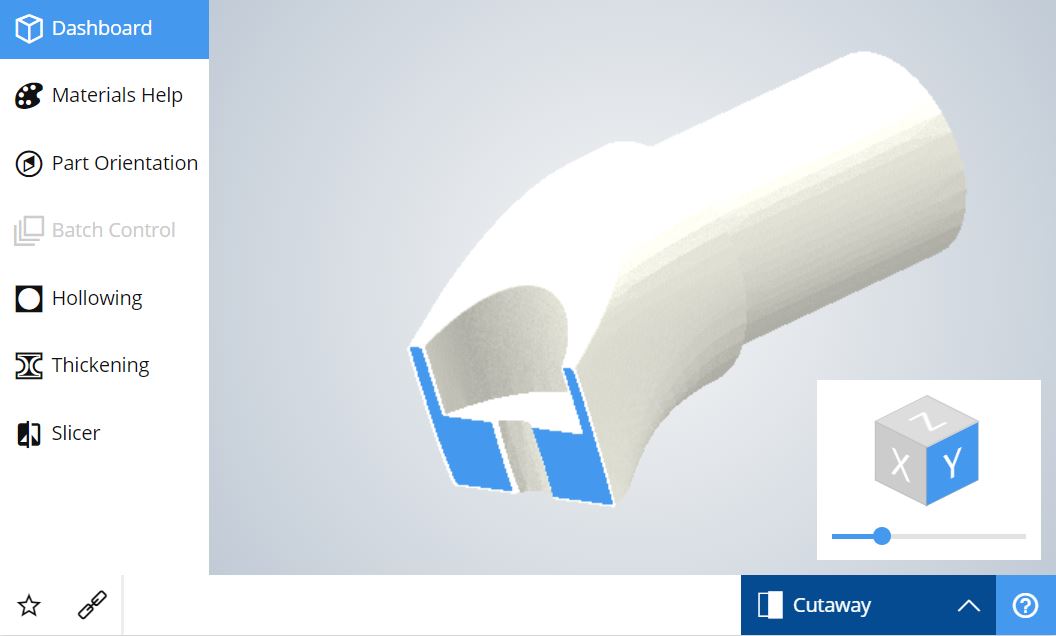
La fonctionnalité 'Vue en Coupe' permet de visualiser l'intérieur de son modèle 3D.
Cela offre la possibilité de contrôler 2 points essentiels:
- S'assurer que votre modèle 3D est correctement évidé et que les trous positionnés (éventuellement par notre outil 'Evider') sont bien placés pour permettre une bonne évacuation de la poudre.
- Vérifier qu'il existe bel et bien un espace entre les différents volumes composant un objet mobile
Pour utiliser la vue en coupe, il vous suffit de sélectionner "Vue en coupe" au lieu de "Vue par défaut", en bas à gauche de la Visionneuse 3D.
- [Order your 3D Parts](https://www.sculpteo.com/en/upload/)
- [Business Services](https://www.sculpteo.com/en/services/)
[](http://www.sculpteo.com)
[mailto:contact@sculpteo.com](mailto:contact@sculpteo.com)
Copyright © 2026, Sculpteo